23 November 2011
What Is the Meta Description Tag?
It’s a snippet of HTML code that belongs inside the section of a web page. It is usually placed after the Title tag and before the Meta keywords tag (if you use one), although the order is not important.
The proper syntax for this HTML tag is:
If you’re using a content management system (CMS), look for a field to fill out that’s called Meta Description, or possibly just “Description.”
There are 3 important ways that Meta descriptions are being used today that make them an important part of your SEO and overall online marketing strategy:
1. They can be used as the description (or part of the description) of your page if it shows up in the search results.
2. They are often used as part of the descriptive information for your pages when Google shows “extended sitelinks” for your site.
3. They are often used as the default description in social media marketing links such as Facebook and Google+.
Let’s look at each of these in more detail.
1. Meta Descriptions in the Search Results
People often think that whatever they put in their Meta description tag will be the default description that the search engines use under the clickable link to their site in the search results. While this is sometimes true, it’s not always the case.
Currently, if you’re searching for a site by its URL (for example www.h2lonlinemarketing.co.za) Google tends to use the first 20 to 25 words of your Meta description as the default description in the search engine result pages (SERP). However, if you have a listing at DMOZ, also known as the Open Directory Project (ODP) and are not using the “noodp” tag, they may default to that description instead. (Do a search at Google for www.amazon.com to see an example.)
Bing and Yahoo!, on the other hand, don’t always default to the Meta description tag for URL searches. Sometimes they do, and sometimes they don’t. A search for www.h2lonlinemarketing.co.za at Bing or Yahoo! shows content from my home page as the description rather than the contents of our Meta description tag.
Of course, real people aren’t typically searching for a site by URL, so what the search engines show for those types of search queries is not as important as a true keyword search. So don’t get hung up on what you see when you search for your site by its URL or if you’re doing a “site:command” search to see how they’re indexing your pages.
Instead, go to your favorite web analytics program and find the keyword phrases that are currently bringing you the most traffic. Then see what your description looks like at Google when you type in those keywords.
And surprise! What you’ll find is that your search results description will be different for every search query! You may see any combination of the following used:
* Your entire Meta description tag text as the complete description (typically if it’s highly relevant and contains no more than 25 words).
* A full sentence pulled from your Meta description tag, but not the entire Meta description (if it contains more than one sentence).
* Text from one part of your Meta description mashed together with text from another part of it (if it’s more than 25 words long).
* Some text from your Meta description mashed together with some text from the page.
* Some text from your page mashed together from some other text from your page (nothing from the Meta description).
Some of the circumstances that cause Google to not use text from your Meta description may include:
* The information in the Meta description tag was not specific to the page it was on.
* The search query used some words that were not in the Meta description, but those words (or some of them) were used in the page content.
My recommendation is to always use keywords on any pages where you get search engine visitors (or hope to get them). Make them very specific to the page they’re on by describing what someone will find when they click through to the page from the search results, while also using variations of your targeted keywords.
Because Google will show only show around 20 to 25 words as your description, many SEOs recommend that you limit this tag to a certain number of characters.
For instance, if you’re optimizing a page for 3 different keyword phrases, you could write a 3-sentence Meta description tag, with each sentence focusing on a different phrase. You could probably even insert more than 3 phrases in those sentences if you’re a good wordsmith. The idea, however, is not to stuff this tag full of keywords, but to write each sentence to be a compelling marketing statement – a statement that naturally uses the keywords people might be typing into Google to find your site.
Overall, the Meta description tag gives you a little bit more control over what people might see before they click over to your site. The more compelling it is, the more clickthroughs you should see. If your Meta description tags can help with that, then it’s certainly worth the few minutes of time it takes to create interesting, keyword-rich tags that sum up what users will find when they arrive!


21 November 2011
Using Facebook for business
1. Invite by welcoming
The Welcome-tab is an essential tool.
Yes, big brands like Vin Diesel, Paul Walker, Fretzie Bercede etc. use
it. No, you are not imitating them; just making use of what is available
to all. You can make your page look different and exciting. This would
organically invite people to your page. The welcome page is the
influencing page which can present a clear ‘call-to-action’ to your page
visitors; if it’s good then your page would be liked by many
automatically!
2. Coupons, offers available
You can dole out “special discounts and offers” to your fans (only!). Also, the people who are not your fans can be enticed by showcasing your offers but not providing them. This would be a compelling tactic that would make them ‘like’ your page. Giving discounts and offers is an old marketing technique of course, but in social media it performs as a ‘likeable’ tool!

3. Learn more of their expectations
Your company is in the process of
building up and formation. So it’s always better to learn what your
consumers demand from you. You can create quizzes or polls for a
particular query and know what your customers are looking for! The level
of participation would also let you the number of people interested in
your business. Use the polls app on Facebook to know your customers best!
4. Updating is crucial

Your page needs to be updated regularly. Make activity on your page, keep it going! Update about the customer-friendly stuff your company just created, the deals happening etc. Share as much as possible! Let them know your company works just like the large busy industry. Make an impression.

5. Yes, you’re answerable!
You owe responses to all the comments
by your fans. If you are responding well, your customers would certainly
feel they have a space in your business. Respond them positively and be
transparent. Further, accept criticism since they’re the experiencers
of your products. They know the faults best. Accept it and correct it
abidingly. Respect the complaints by your ROIs.
05 November 2011
Mobile Website Design
Did you know that in the world today there are more than 2.4 billion
mobile phone users, and a thousand more are added every minute!
About 30% of these mobile phone owners (more than 700 million and growing) have browsed the Internet through their mobile phones. This is the reason why mobile Web browsing is predicted to become the next predominant Internet platform.

In mobile phones, the technology called the WAP is used for browsing. Because of the limitations of WAP browsers in terms of screen size and allowable download, you will need to strip down your current design.
The easiest way to build your mobile Website is to modify your existing Internet site to make it compatible for mobile handsets. If you decide to do so, expect that there will be big changes in terms of layout, design and construction.
Here are some principles about mobile Web design that you should take note of before proceeding to build one of your own:
Having a mobile friendly website is especially important for businesses who want to increase their exposure onto a fresh, up-and-coming platform ahead of their closest competitors. However, designing and optimising sites for various mobile platforms is very challenging due to the amount of smart phone platforms available .
The fact is that people accessing the web via their phone are having to deal with smaller screen and slower connection times, meaning that a site that looks impressive on a PC may lose quality and functionality when accessed with a mobile.
There’s a lot to take into consideration when it comes to this kind of specialist website design development. Sites need to be optimised for all of the latest browsing devices, such as iPhones, iPad, Blackberry and Android platforms (amongst others), which can be a time-consuming process.
Scream Media is proud to offer affordable solutions when it comes to mobile web development and urges any company lacking a sound mobile presence to get in touch before they lose out on exposure and revenue generated from on-the-go web browsing.
About 30% of these mobile phone owners (more than 700 million and growing) have browsed the Internet through their mobile phones. This is the reason why mobile Web browsing is predicted to become the next predominant Internet platform.
The Basic Principles of Mobile Website Design
First, you have to know that the Web site design and construction generally used for computer browsers is not compatible with that of mobile phones. For your site to work well on a mobile handset, it must follow the accessibility design guidelines for building mobile Websites which are set by the W3C.In mobile phones, the technology called the WAP is used for browsing. Because of the limitations of WAP browsers in terms of screen size and allowable download, you will need to strip down your current design.
The easiest way to build your mobile Website is to modify your existing Internet site to make it compatible for mobile handsets. If you decide to do so, expect that there will be big changes in terms of layout, design and construction.
Here are some principles about mobile Web design that you should take note of before proceeding to build one of your own:
- Websites which make use of tables for the main layout will not look right on mobile phones.
- Your site must use CSS for the layout to ensure maximum compatibility.
- It is easiest if your site is coded using either XML or XHTML, with your character encoding set at UTF-8.
- You have to consider that different mobile phones have different screen sizes. This can be a major headache if you want your mobile Web site design to run on all of them.
- Remember to put all the most important information that you want mobile users to see on the top of the page. It can be time consuming to browse through a mobile site, not to mention tedious to read through. Make your mobile site design convenient for your consumers.
- It is difficult to enter text in mobile Web sites. You may want to offer your user the convenience of radio buttons and lists, which they can choose from depending on what they need.
- If you wish to put images on your mobile Website, it should be in jpeg or gif format.
- A good mobile Web site design provides back buttons and links. Many phones are not equipped with back buttons, so try to provide one.
- Keep in mind that the maximum page size for a mobile page is only 20 kilobytes. Make everything fit into that number.
- Lastly, you should bear in mind that users are actually paying fees to access your mobile Website. Make sure that they are getting their money's worth!
Having a mobile friendly website is especially important for businesses who want to increase their exposure onto a fresh, up-and-coming platform ahead of their closest competitors. However, designing and optimising sites for various mobile platforms is very challenging due to the amount of smart phone platforms available .
The fact is that people accessing the web via their phone are having to deal with smaller screen and slower connection times, meaning that a site that looks impressive on a PC may lose quality and functionality when accessed with a mobile.
There’s a lot to take into consideration when it comes to this kind of specialist website design development. Sites need to be optimised for all of the latest browsing devices, such as iPhones, iPad, Blackberry and Android platforms (amongst others), which can be a time-consuming process.
Scream Media is proud to offer affordable solutions when it comes to mobile web development and urges any company lacking a sound mobile presence to get in touch before they lose out on exposure and revenue generated from on-the-go web browsing.
12 October 2011
The not so humble Description Tag
Meta tags are often very misunderstood, people often get confused with the different types of tags available. In short your meta description
tag is often used as the snippet on the search results pages to describe your
site. So apart from including keywords, it has to do the job of convincing people
to click on it.
A nonsensical list of keywords is not going to convince people to click so you have to balance it out with an appealing sentence, preferably including a call-to-action or reason to click.

Yes, it’s important to put your keywords at the start of the tag if you can, but you have up to 160 characters in that tag indexed by search engines, so you should use the space to your advantage. Having a short, unimaginative meta description tag or simply copying your title tag is not going to make any difference to your overall rankings and is more likely to turn your potential visitors off.
Google admitted that it no longer considers the meta description tag in their ranking algorithm anyway, so, other search engines aside, the main job of the tag in Google SERPs is to convince people to click on the link and visit your site.
Put it this way: if you were in the market for an antique chair and you saw the following two listings in Google, which one would you click on?
Got it? Why not let the experts help. Contact Scream Media today on 021 5590800
A nonsensical list of keywords is not going to convince people to click so you have to balance it out with an appealing sentence, preferably including a call-to-action or reason to click.
Yes, it’s important to put your keywords at the start of the tag if you can, but you have up to 160 characters in that tag indexed by search engines, so you should use the space to your advantage. Having a short, unimaginative meta description tag or simply copying your title tag is not going to make any difference to your overall rankings and is more likely to turn your potential visitors off.
Google admitted that it no longer considers the meta description tag in their ranking algorithm anyway, so, other search engines aside, the main job of the tag in Google SERPs is to convince people to click on the link and visit your site.
Put it this way: if you were in the market for an antique chair and you saw the following two listings in Google, which one would you click on?
- Site1.com – “Antique Dining Chairs.”
- Site2.com – “Antique Dining Chairs – over 500 chairs on display at the Glebe Antique Centre. Dining chairs to match your table, occasional chairs for that special place in your home.“
Got it? Why not let the experts help. Contact Scream Media today on 021 5590800
11 October 2011
SEO and Blogs
If you don't optimize your blog—or other online content—there's a good chance
you're missing out on higher search-engine rankings that could extend your reach
well beyond your site's current readership. But take heart: Sometimes all you
need are a few tweaks here and there.
Arrange your post's content in logical order. Think back to the essay format you learned in grade school: an introductory paragraph followed by supporting evidence and a conclusion. It improves readability for human visitors, and will earn a search engine's approval.
Pay attention to word count. According to Google an article should contain at least 200 words. (For eyeballing purposes, most Get to the Po!nt newsletters are between 250 and 300 words.) We recommend writing to a target length in the 400-to-500-word range.
Be sure to use local keywords. If your company offers products or services to a specific region, incorporate terms that local customers will likely use when searching for companies in your area.
Choose an image that complements your text. This provides visual interest for the reader, and you gain SEO points with a keyword in the photo description tag.
Don't duplicate and resubmit content. As with keyword stuffing, this raises major red flags for search engines—and they'll likely treat you like a spammer. "That could be the kiss of death for your site.
Remember to deep link back to your website. In bound links are essential for SEO, with a Blog you have control over these ln bound links. Look at the heading of this paragraph and you will see exactly what I mean!.
Tweak it one more time. If your blog delivers valuable content, you're already winning most of your SEO battles
 |
| SEO Friendly Blogs help you get found on Google |
Arrange your post's content in logical order. Think back to the essay format you learned in grade school: an introductory paragraph followed by supporting evidence and a conclusion. It improves readability for human visitors, and will earn a search engine's approval.
Pay attention to word count. According to Google an article should contain at least 200 words. (For eyeballing purposes, most Get to the Po!nt newsletters are between 250 and 300 words.) We recommend writing to a target length in the 400-to-500-word range.
Be sure to use local keywords. If your company offers products or services to a specific region, incorporate terms that local customers will likely use when searching for companies in your area.
Choose an image that complements your text. This provides visual interest for the reader, and you gain SEO points with a keyword in the photo description tag.
Don't duplicate and resubmit content. As with keyword stuffing, this raises major red flags for search engines—and they'll likely treat you like a spammer. "That could be the kiss of death for your site.
Remember to deep link back to your website. In bound links are essential for SEO, with a Blog you have control over these ln bound links. Look at the heading of this paragraph and you will see exactly what I mean!.
Tweak it one more time. If your blog delivers valuable content, you're already winning most of your SEO battles
30 September 2011
The Importance of Anchor Text for SEO
Anchor text is perhaps one of the most important aspects of Search Engine
Optimization but it is also one of the least talked about. Anchor text is the visible text of a hyperlink, for example the text
link below links to our home page www.h2lonlinemarketing.co.za with the
anchor text - h2lonlinemarketing.
This one element of SEO is important to understand because it can help your page get ranked for a target keyword and also help you evaluate your competition more precisely.
The latter is critical and, in fact, if you don’t take anchor text backlinks into proper consideration when looking at the competition for a keyword you could be missing out on some hidden gems that are easy to rank for.
What Is Anchor Text?
Anchor text is the hyperlinked text you see on a webpage. It is the visible words that you can click to take you to another page. Anchor text html code looks like this:
<a href=”http://www.yoursite.com”>Your Anchor
Text</a>
On most websites, you typically see this as blue text that is underlined and when you click on it with your mouse, you are taken to the corresponding url.
How Bloggers Use Anchor Text
Bloggers and website owners use anchor text naturally to point to other pages on their website as well as pages on other sites that they find relevant to what they are blogging about. You’ve probably even done this yourself when writing a post where you referenced another post on your site, an affiliate product or even a post on another site.
Usually a blogger will use a phrase that indicates what the page is about in the anchor text, as opposed to a url, so that the sentence reads correctly.
The anchor text in these links helps both the visitor and the search engine spiders figure out what the ‘linked to’ page is about.
How Search Engines Use Anchor Text
Search engines use anchor text to help them figure out what the hyperlinked page is about. So, as you can see, getting anchor text backlinks with relevant phrases in the anchor text is pretty important if you want the search engines to rank you for a particular keyword phrase.
In fact, anchor text is such an important factor in ranking a page that pages can rank for a keyword phrase even when that phrase does not appear in the url on the page!
There are several cases where this has happened, but perhaps the most famous is where the Adobe Reader download page ranked number
1 for the search term ‘click here’ for many years even though those words were nowhere on the page. So many people had linked to that page using the anchor text ‘click here’ that it got to the number 1 spot without any on page SEO for the term.
Search engines place a large importance on external anchor text (links coming in from other sites) and some importance on internal anchor text (links from within your own site) when ranking a page so it stands to reason that you should make getting anchor text backlinks with your target keyword phrases a priority.
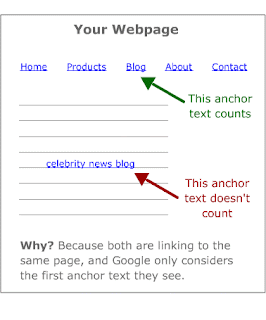
One important thing to note is that it is widely thought that if two links on the same page target the same url, that only the first link is counted by Google so you want to be sure that you use your desired anchor text in that first link.
How Anchor Text is Important When Judging Competition for a Keyword
If you think about how important anchor text is to the search engines when determining ranking for a keyword, then it’s easy to see why it is a critical component of analyzing the competition for a particular keyword phrase.
Allinanchor:”your keyword phrase”
This will return the pages which have anchor text pointing to it that contain the quoted keyword phrase.
I hope you can see how powerful this is – first of all, Google must think it is an important element of a page because it provides the allinanchor operator. Just the existence of the operator would seem to indicate that it uses the anchor text when deciding what a page is about and ranking it.
Secondly, using this operator will show you which pages are optimizing for your chosen keyword phrase!
It makes sense that only the pages that have anchor text backlinks with your phrase are the ones optimizing for it so you can forget about searching for your phrase in quotes or any of that nonsense.
Not only that but, you can take a look at the actual backlinks for each of your competitors and see how many of them have that anchor text and what the strength of those links are to make a more educated guess as to how difficult they will be to beat out for that top spot.
Anchor Text “Best Practices” For Your Website
Now that you know how important anchor text is to your rankings, I’m sure you will want to pay more attention to it in your SEO efforts but you don’t want to go hog wild and create tons of anchor text backlinks all with the same keyword phrase or you might find that your efforts don’t yield the results you want.
Here are some things to consider:
1. Vary Your Anchor Text – We all know that Google prefers it when people link to you naturally and when that is the case, they don’t all use the same anchor text. So, when you are linking to your site from your articles or web2.0 properties you want to
make sure you don’t always use the same phrase as well. Using your target phrase in about 50% – 60% of the links is probably a good idea.
2. Links From Relevant Pages – For the best results, you want your anchor text backlinks to come from pages that are related to your topic. This is what would happen naturally if people were linking to you and it would most likely be from a blog post on the same topic.
3. First Link On Page – Don’t forget that Google only counts the anchor text from the first link that it sees so if you have more than one link to the same url on a page, act accordingly.
4.Plan For Natural Linking – There’s nothing better than having people just naturally link to one of your posts but, of course, you can’t control the anchor text they use when they do. Since most people will naturally use your headline as anchor text, you want to be sure to consider that when coming up with the title for your blog posts.
Anchor text is crucial to both your SEO efforts as well as when analyzing the competition for a keyword phrase. Taking the time to use it properly can be the difference between ranking in the top 3 and not ranking at all so it’s in your best interest to start putting better anchor text practices to use in your business today!

This one element of SEO is important to understand because it can help your page get ranked for a target keyword and also help you evaluate your competition more precisely.
The latter is critical and, in fact, if you don’t take anchor text backlinks into proper consideration when looking at the competition for a keyword you could be missing out on some hidden gems that are easy to rank for.
What Is Anchor Text?
Anchor text is the hyperlinked text you see on a webpage. It is the visible words that you can click to take you to another page. Anchor text html code looks like this:
On most websites, you typically see this as blue text that is underlined and when you click on it with your mouse, you are taken to the corresponding url.
How Bloggers Use Anchor Text
Bloggers and website owners use anchor text naturally to point to other pages on their website as well as pages on other sites that they find relevant to what they are blogging about. You’ve probably even done this yourself when writing a post where you referenced another post on your site, an affiliate product or even a post on another site.
Usually a blogger will use a phrase that indicates what the page is about in the anchor text, as opposed to a url, so that the sentence reads correctly.
The anchor text in these links helps both the visitor and the search engine spiders figure out what the ‘linked to’ page is about.
How Search Engines Use Anchor Text
Search engines use anchor text to help them figure out what the hyperlinked page is about. So, as you can see, getting anchor text backlinks with relevant phrases in the anchor text is pretty important if you want the search engines to rank you for a particular keyword phrase.
In fact, anchor text is such an important factor in ranking a page that pages can rank for a keyword phrase even when that phrase does not appear in the url on the page!
There are several cases where this has happened, but perhaps the most famous is where the Adobe Reader download page ranked number
1 for the search term ‘click here’ for many years even though those words were nowhere on the page. So many people had linked to that page using the anchor text ‘click here’ that it got to the number 1 spot without any on page SEO for the term.
Search engines place a large importance on external anchor text (links coming in from other sites) and some importance on internal anchor text (links from within your own site) when ranking a page so it stands to reason that you should make getting anchor text backlinks with your target keyword phrases a priority.
One important thing to note is that it is widely thought that if two links on the same page target the same url, that only the first link is counted by Google so you want to be sure that you use your desired anchor text in that first link.
How Anchor Text is Important When Judging Competition for a Keyword
If you think about how important anchor text is to the search engines when determining ranking for a keyword, then it’s easy to see why it is a critical component of analyzing the competition for a particular keyword phrase.
Allinanchor:”your keyword phrase”
This will return the pages which have anchor text pointing to it that contain the quoted keyword phrase.
I hope you can see how powerful this is – first of all, Google must think it is an important element of a page because it provides the allinanchor operator. Just the existence of the operator would seem to indicate that it uses the anchor text when deciding what a page is about and ranking it.
Secondly, using this operator will show you which pages are optimizing for your chosen keyword phrase!
It makes sense that only the pages that have anchor text backlinks with your phrase are the ones optimizing for it so you can forget about searching for your phrase in quotes or any of that nonsense.
Not only that but, you can take a look at the actual backlinks for each of your competitors and see how many of them have that anchor text and what the strength of those links are to make a more educated guess as to how difficult they will be to beat out for that top spot.
Anchor Text “Best Practices” For Your Website
Now that you know how important anchor text is to your rankings, I’m sure you will want to pay more attention to it in your SEO efforts but you don’t want to go hog wild and create tons of anchor text backlinks all with the same keyword phrase or you might find that your efforts don’t yield the results you want.
Here are some things to consider:
1. Vary Your Anchor Text – We all know that Google prefers it when people link to you naturally and when that is the case, they don’t all use the same anchor text. So, when you are linking to your site from your articles or web2.0 properties you want to
make sure you don’t always use the same phrase as well. Using your target phrase in about 50% – 60% of the links is probably a good idea.
2. Links From Relevant Pages – For the best results, you want your anchor text backlinks to come from pages that are related to your topic. This is what would happen naturally if people were linking to you and it would most likely be from a blog post on the same topic.
3. First Link On Page – Don’t forget that Google only counts the anchor text from the first link that it sees so if you have more than one link to the same url on a page, act accordingly.
4.Plan For Natural Linking – There’s nothing better than having people just naturally link to one of your posts but, of course, you can’t control the anchor text they use when they do. Since most people will naturally use your headline as anchor text, you want to be sure to consider that when coming up with the title for your blog posts.
Anchor text is crucial to both your SEO efforts as well as when analyzing the competition for a keyword phrase. Taking the time to use it properly can be the difference between ranking in the top 3 and not ranking at all so it’s in your best interest to start putting better anchor text practices to use in your business today!
12 September 2011
Facebook Myth's
Facebook promotions take many forms.

One brand will give away instant-print coupons behind a “like” gate. Another will reward random fans for posting on the brand’s wall. And still another will host a sweepstakes in a custom third-party application.
Can you guess which one of these is violating Facebook’s rules and is likely to see their page brought down?
Alas, Facebook resembles the wild west of social networking. And just as the lawless land of email marketing was tamed a decade ago, the ever-evolving Facebook platform is being settled by emerging best practices, updates to the user experience, and Facebook’s stringent promotion guidelines.
If an objective of your contest is to “go viral”, Facebook wants to stop you. Why? First, Facebook wants you to pay them to drive impressions and engagement through its advertising
platform. Additionally, thanks to game publishers like Zynga (the makers of Farmville and Mafia Wars), viral tactics are now widely considered annoying by Facebook users. Facebook’s desire to make money while delivering an uncluttered user experience means the virality you seek isn’t likely to happen.
MYTH: Clicks on your "Like" button = brand engagement.
REALITY: It's not that easy. Make your brand worth spending time with and you'll achieve real engagement: passion and loyalty. As social media blogger Jay Baer candidly quipped, "I have a deeper engagement with a can of beer than I do with the 'Like' button."
MYTH: Trolls will take over my contest and fan page. REALITY: A clear, thought-out social plan and solid promotions will keep trolls on a short leash. People are people, online as in life, and they'll share negative (and sometimes inappropriate) views as well as positive ones.
MYTH: Giving away an iPad is enough. REALITY: Making fans do stuff for prizes is ineffective; they know the odds of winning are low. Align prizing with your brand and ensure everyone walks away a true winner!
MYTH: I don't need rules for my Facebook contest. REALITY: The legal ramifications of running a contest on any medium are complicated, especially when you're doling out prizes. Seek legal counsel before your promotion, make the rules of the game very clear to players, and safeguard against abuse of those rules.
The Po!nt: Don't be fooled by Facebook's pretty face; it's a jungle in there. Thankfully, that jungle has safe pathways. Take time to learn them, and you'll produce a bunch of cool new inroads with happy, engaged fans. Scream Media has over 8 years experience navigating Facebook and other Social Media platforms. Contact us today on 021 5590800 for a free, no obligation quote.

One brand will give away instant-print coupons behind a “like” gate. Another will reward random fans for posting on the brand’s wall. And still another will host a sweepstakes in a custom third-party application.
Can you guess which one of these is violating Facebook’s rules and is likely to see their page brought down?
Alas, Facebook resembles the wild west of social networking. And just as the lawless land of email marketing was tamed a decade ago, the ever-evolving Facebook platform is being settled by emerging best practices, updates to the user experience, and Facebook’s stringent promotion guidelines.
If an objective of your contest is to “go viral”, Facebook wants to stop you. Why? First, Facebook wants you to pay them to drive impressions and engagement through its advertising
platform. Additionally, thanks to game publishers like Zynga (the makers of Farmville and Mafia Wars), viral tactics are now widely considered annoying by Facebook users. Facebook’s desire to make money while delivering an uncluttered user experience means the virality you seek isn’t likely to happen.
MYTH: Clicks on your "Like" button = brand engagement.
REALITY: It's not that easy. Make your brand worth spending time with and you'll achieve real engagement: passion and loyalty. As social media blogger Jay Baer candidly quipped, "I have a deeper engagement with a can of beer than I do with the 'Like' button."
MYTH: Trolls will take over my contest and fan page. REALITY: A clear, thought-out social plan and solid promotions will keep trolls on a short leash. People are people, online as in life, and they'll share negative (and sometimes inappropriate) views as well as positive ones.
MYTH: Giving away an iPad is enough. REALITY: Making fans do stuff for prizes is ineffective; they know the odds of winning are low. Align prizing with your brand and ensure everyone walks away a true winner!
MYTH: I don't need rules for my Facebook contest. REALITY: The legal ramifications of running a contest on any medium are complicated, especially when you're doling out prizes. Seek legal counsel before your promotion, make the rules of the game very clear to players, and safeguard against abuse of those rules.
The Po!nt: Don't be fooled by Facebook's pretty face; it's a jungle in there. Thankfully, that jungle has safe pathways. Take time to learn them, and you'll produce a bunch of cool new inroads with happy, engaged fans. Scream Media has over 8 years experience navigating Facebook and other Social Media platforms. Contact us today on 021 5590800 for a free, no obligation quote.
Subscribe to:
Posts (Atom)