There are a variety of misconceptions surrounding search engine optimization today. One big misconception that many website owners have is that once they have their site set up and they submit it to search engines, they’ll get traffic right away. The truth is that there is a lot more to bringing traffic to your website. Search engine optimization is a task that is ongoing and it does take quite a bit of work. Instead of submitting your site to the search engines right away, here are a few critical steps to great SEO that you should take first.
Step #1 – Research Your Keywords
One of the important steps you need to take for great SEO before you submit your site to the search engines is to research your keywords. No doubt, you already know what the topic of your site is all about. It is important that you choose the right keywords now before you submit your site. When you select keywords, keep in mind criteria that the search engines have for keywords. Look for niche keywords instead of keywords that are so broad you’ll never rank well with them.
Step #2 – Improve Your Title Tags
Another step to take before submitting to the search engines is improving your title tags. One of the biggest things that will determine your score within the search engines is the appearance of keywords in the title tags. Do not go with title tags that don’t use your keywords. Your title tags should be keyword rich, which can help you ensure that you get strong rankings when your site is submitted to the search engines.
Step #3 – Check Out Your Site Technology
Take some time to check out your site technology before submitting your site to the search engines as well. Some technology built into sites can end up confusing the spiders that crawl through websites. Image maps, CGI scripts, frames, and other types of technology may not be understood by many of the spiders out there. Go through your site carefully and ensure that technology is not holding you back from getting high rankings in the search engines.
Step #4 – Check for Errors
Checking your website for errors is also going to be a critical step to great SEO. It’s a good idea to use a site maintenance tool to make sure that you catch any errors before you start bringing customers to your website. Any errors in HTML can end up causing problems for search engine spiders. Not only can errors cause problems with spiders, but they can also be frustrating to site a user, which means they may leave your site. Now is the time to ensure that any errors are taken care of.
Each of these steps is essential to the success of your website. Before you submit your website to the search engines, go through these steps and ensure that your site is ready. For professional advise on SEO contact Scream Media today - make sure your SEEN on the web.
Showing posts with label search engine optimisation. Show all posts
Showing posts with label search engine optimisation. Show all posts
20 July 2010


25 May 2010
Want more visitors to your website?
Many visitors to your website will arrive via a search engine. Making your website more visible on search engines will hook potential customers, so follow our simple steps to improve your ranking.
Things to do today…
• Make a list of keywords and phrases that best describe your products and services. Run keywords through a keyword tool to identify any additional possibilities and find out how frequently they are searched for
• Go online and find appropriate businesses that might be able to provide reciprocal links to your website
Short term actions
Use search engine optimisation There are certain things you can do to improve your website’s search engine ranking.
• Make your site accessible. Well- written, easy to navigate pages will attract repeat visitors and may
help push your website up the search engine rankings (see chapter one).
• Use keywords and phrases.
Decide which keywords and phrases are unique to your industry products and services. Be fairly specific, eg ‘organic local apples’ will generate more qualified search engine leads than ‘apples’. Run these through a keyword tool to identify additional possibilities. Target these key phrases in web content, page titles, headings, sub-headings and any metadata included in the page code.
• Include an HTML link to a basic site map on every page of your website. Search engines will then be able to index pages of your site, increasing the chance of your site appearing in searches.
• Include reciprocal links. Use search engines to find websites that have high rankings for appropriate key terms and phrases. Contact them and ask if they will include a link to your website in return for a reciprocal link.
• Make sure your website is useful. This will encourage others to link to your site of their own accord. These one way links are often more effective than reciprocal links.
Top tip
• Don’t compromise the quality of your web copy in an effort to fill it with keywords. Search engines could penalise you for this and your rating will drop.
Start a pay per click campaign
A pay per click (PPC) campaign will further improve your web presence.
A PPC campaign involves posting sponsored links or adverts on search engine websites. When users search for keywords related to your business,
2. Search engine marketing
your sponsored link appears in a column often to the right or above the natural or organic search results.
A PPC campaign is cost-effective as you only pay for click-through to your site. The results can be easily tracked allowing you to optimise your campaigns. Set a daily budget and your advert will be switched off once your allowance is spent.
Plan your pay per click campaign Careful planning will help you maximise the success of your
PPC campaign.
Consider the following:
• Which visitors you want to attract.
• Whether you want to target local or regional customers, a particular age-group or
particular-interest customers.
• How many unique adverts you want to create for each advert group. These will need to be tested against each other to find the most effective.
• When you want adverts to be activated and for how long.
• Which keyword searches will generate your sponsored link.
A broad match will trigger your advert more frequently than an exact match and could mean your advert is shown inappropriately.
• How much you are willing to bid initially for each click.
For more information about running a successful online advertising campaign contact Scream Media today for a FREE no obligation quote.
Things to do today…
• Make a list of keywords and phrases that best describe your products and services. Run keywords through a keyword tool to identify any additional possibilities and find out how frequently they are searched for
• Go online and find appropriate businesses that might be able to provide reciprocal links to your website
Short term actions
Use search engine optimisation There are certain things you can do to improve your website’s search engine ranking.
• Make your site accessible. Well- written, easy to navigate pages will attract repeat visitors and may
help push your website up the search engine rankings (see chapter one).
• Use keywords and phrases.
Decide which keywords and phrases are unique to your industry products and services. Be fairly specific, eg ‘organic local apples’ will generate more qualified search engine leads than ‘apples’. Run these through a keyword tool to identify additional possibilities. Target these key phrases in web content, page titles, headings, sub-headings and any metadata included in the page code.
• Include an HTML link to a basic site map on every page of your website. Search engines will then be able to index pages of your site, increasing the chance of your site appearing in searches.
• Include reciprocal links. Use search engines to find websites that have high rankings for appropriate key terms and phrases. Contact them and ask if they will include a link to your website in return for a reciprocal link.
• Make sure your website is useful. This will encourage others to link to your site of their own accord. These one way links are often more effective than reciprocal links.
Top tip
• Don’t compromise the quality of your web copy in an effort to fill it with keywords. Search engines could penalise you for this and your rating will drop.
Start a pay per click campaign
A pay per click (PPC) campaign will further improve your web presence.
A PPC campaign involves posting sponsored links or adverts on search engine websites. When users search for keywords related to your business,
2. Search engine marketing
your sponsored link appears in a column often to the right or above the natural or organic search results.
A PPC campaign is cost-effective as you only pay for click-through to your site. The results can be easily tracked allowing you to optimise your campaigns. Set a daily budget and your advert will be switched off once your allowance is spent.
Plan your pay per click campaign Careful planning will help you maximise the success of your
PPC campaign.
Consider the following:
• Which visitors you want to attract.
• Whether you want to target local or regional customers, a particular age-group or
particular-interest customers.
• How many unique adverts you want to create for each advert group. These will need to be tested against each other to find the most effective.
• When you want adverts to be activated and for how long.
• Which keyword searches will generate your sponsored link.
A broad match will trigger your advert more frequently than an exact match and could mean your advert is shown inappropriately.
• How much you are willing to bid initially for each click.
For more information about running a successful online advertising campaign contact Scream Media today for a FREE no obligation quote.
05 March 2010
SEO Tips
Frankly, the biggest search engine optimization mistake you can make is not doing any SEO at all. It's amazíng how many people believe "if you build it, they will come." Marketing coaching makes one thing clear. Just putting a site up on the Internet won't get you the traffic you want or need. By the same token, building a site and then thinking about SEO after the fact is a bad plan too. SEO needs to be at the heart of your Web plans from day one, and it's a job that isn't ever "finished."
Learn What's Bad For SEO And Don't Do It
If you take a drawing class, one of the first things you'll learn is that it's easier to look at the negative space than at the object itself. That means that as a beginner, you have a better shot at recreating the funky-looking space between the apple and the pear than drawing the fruit the first time you pick up a pencil. And you don't get so discouraged when your results aren't perfect. That's a good concept to carry into online marketing.
Learn What's Bad For SEO And Don't Do It
If you take a drawing class, one of the first things you'll learn is that it's easier to look at the negative space than at the object itself. That means that as a beginner, you have a better shot at recreating the funky-looking space between the apple and the pear than drawing the fruit the first time you pick up a pencil. And you don't get so discouraged when your results aren't perfect. That's a good concept to carry into online marketing.
Sometimes learning everything that can go wrong is a better place to start than trying to do everything right. Do-it-yourself, affordable SEO is too expensive at any cost if you're constantly shooting yourself in the foot. Some of the biggest mistakes novices make are really the easiest ones to avoid!
Bad Navigation And No Sitemap
It doesn't take a marketing coach to know that the entire point of "search engine optimization" on a site is to get that site crawled by the search engines. If you use images -- or worse -- Flash or javascript to design your navigation, the search engines will ignore you. (Also, any page that doesn't have an incoming link won't be crawled.)
Not having a sitemap is just as bad. Many website owners don't think they need a sitemap because people don't use them. It's not about people! Search engines love sitemaps. They literally crawl all over sitemaps. Even if you have to maintain the sitemap manually, have one and link to it on every page of your site.
Poorly Constructed Title Tags And URLs
There's nothing wrong with building your website, but pay attention to what your software is doing. Many site building packages and content management systems repeat the same title tag on every single page. Good programs of marketing coaching teach you that the title tag is probably the single most-important SEO element of any page. The title tag must fit the content of the page itself.
But, don't pay attention to the title tag and ignore the URL. This is especially a problem in content management systems and shopping carts. The URLs are full of numbers and letters. You need to be including your keywords in your URLs so the search engines pick up on them. Don't waste the invaluable potential in either the title tag or the URL.
Bad Navigation And No Sitemap
It doesn't take a marketing coach to know that the entire point of "search engine optimization" on a site is to get that site crawled by the search engines. If you use images -- or worse -- Flash or javascript to design your navigation, the search engines will ignore you. (Also, any page that doesn't have an incoming link won't be crawled.)
Not having a sitemap is just as bad. Many website owners don't think they need a sitemap because people don't use them. It's not about people! Search engines love sitemaps. They literally crawl all over sitemaps. Even if you have to maintain the sitemap manually, have one and link to it on every page of your site.
Poorly Constructed Title Tags And URLs
There's nothing wrong with building your website, but pay attention to what your software is doing. Many site building packages and content management systems repeat the same title tag on every single page. Good programs of marketing coaching teach you that the title tag is probably the single most-important SEO element of any page. The title tag must fit the content of the page itself.
But, don't pay attention to the title tag and ignore the URL. This is especially a problem in content management systems and shopping carts. The URLs are full of numbers and letters. You need to be including your keywords in your URLs so the search engines pick up on them. Don't waste the invaluable potential in either the title tag or the URL.
Banning A Search Engine By Accident
It's not unusual for a novice site owner to mess up their robots.txt file. The file exists in your site's root directory to talk to search engine spiders. You can tell them not to crawl pages or sections or send other individual instructions. Since the file is just plain text and is so easy to create, site owners wade in without really understanding what they're doing. If you're not careful, you can ban the search engines from your site altogether. Use Yahoo SiteExplorer or Google SiteMaps to make sure that your site can indeed be crawled.
It's not unusual for a novice site owner to mess up their robots.txt file. The file exists in your site's root directory to talk to search engine spiders. You can tell them not to crawl pages or sections or send other individual instructions. Since the file is just plain text and is so easy to create, site owners wade in without really understanding what they're doing. If you're not careful, you can ban the search engines from your site altogether. Use Yahoo SiteExplorer or Google SiteMaps to make sure that your site can indeed be crawled.
Using anchor text like "click here" or "next" is a waste. When you are cultivating incoming links or creating links inside your site, use useful, descriptive anchor text. You don't want to repeat the same phrase over and over again. Get two or three relevant, keyword-rich pieces of anchor text and also use your company name. Empty phrases are just that -- empty.
Doing accurate keyword research is fundamental to successful marketing. It's a huge topic in its own right, but you basically want to concentrate on phrases that are not overly general or that have too much competition. Good marketing coaches will spend a lot of time on keyword selection and you should too. Put that chore right up at the top of your SEO "to do" list.
In reading all the tips available on marketing coaching, you'll find that most articles and courses focus on the things website owners should do. It's also important to look at what you shouldn't do. A poorly constructed site that fails to make good use of readable navigation, workable behind-the-scenes code, solid naming structures, and relevant anchor text will have a tough time online. Consider the fundamentals of basic SEO from the planning stage of your site to maximize your results and get the traffic you want.
Still confused? contact Scream Media today for free no obligation SEO quote
18 February 2010
Marketing your Website on Facebook
Here’s 11 things about Facebook that you need to know:
1. 350 Million Global Users, and Counting
Facebook announced recently that they had passed 350 million members, making Facebook the third-largest country in the world, if it was a country. (perhaps that’s their end-game, joining the UN and raising an army?)
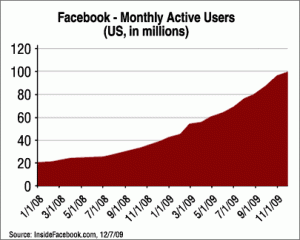
2. 100 Million U.S. Users
Sure, Facebook is strong around-the-world (Canada has the highest penetration rate), but nearly 1/3 of all Facebookers are here in the U.S. You may have heard of a TV show called American Idol. On a good night, it averages 20 million viewers. Facebook has 100 million American members. Hmmm.
3. Average Facebook User Spends 55 Minutes Per Day
Nearly one hour per day, per user. That’s a lot of Facebook time. How can your company grab a bit of consumer attention? This data is based on Facebook’s own published stats, covered by Inside Facebook.
4. Nearly 80,000 sites using Facebook Connect
Connect is the Facebook initiative that has the greatest long-range impact. By integrating Facebook closely, sites are making our personal social graphs truly portable. Instead of having to go to Facebook and other sites to visit our friends, they travel with us online (and in our pockets via mobile devices), always there to provide advice or commentary. Even Yahoo! and MySpace are rolling out deep Facebook integrations.
This of course makes Facebook the central hub of not just social media, but the Web (which is why Google is scrambling to catch up after their competing Google Connect fell flat).
5. Facebook Fan Box Becoming Pervasive
Perhaps the least powerful, but most prevalent flavor of Facebook Connect is Facebook Fan Box, a simple tool for enabling your Web site visitors, YouTube video watchers, or email newsletter recipients to become a fan of your brand – without even having to go to Facebook.
6. Average Facebook User Has 130 Friends
Will Facebook users continue to add more friends at a rapid pace? It depends upon how they view their Facebook connections. 130 friends almost bumps up against Dunbar’s Number of 150 – the theoretical maximum number of actual friend relationships you can sustain, according to British scientist Robin Dunbar.
If Facebook continues to revolve around relationships that you actually possess in three-dimensions – people you “actually” know, then the addition of bunches of new friends may slow considerably. But, if Facebook makes the leap to tie people together more casually (like Twitter), average friend counts could rise dramatically.
7. Average Facebook User Fans 2 Pages per Month
If you think tons of your customers should become fans of your company’s Facebook page, you might want to recalibrate your expectations. The average Facebook user “fans” only 2 new pages per month. That’s not a lot , considering how many brands, causes, and organizations we come into contact with on a regular basis.
If you’re going to make growth of your Facebook fan base a key part of your social media strategy, you must create a clear rationale for why consumers should participate with you.
You also might consider a robust, organized approach for promoting your Facebook fan page.
8. Only 4% of Pages Have 10,000 or More Fans
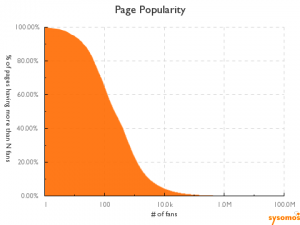
If your Facebook fan page is a bit of a ghost town, you’re not alone. A fantastic study by Sysomos of 600,000 Facebook fan pages shows that only 4% of pages have 10,000 or more fans – and only .76% have 100,000 or more.
That’s why it is so critical to focus your Facebook strategy on activating the fans you have, not just collecting fans like baseball cards.
9. Wall Posts Don’t Impact Popularity
The Sysomos study also found very little correlation between how frequently the Facebook page admin posted to the wall, and total number of fans. However – and this is important – there is a strong correlation between amount of other content (notes, links, photos, videos) and number of fans.
Thus, if you want to grow your Facebook fan base, it is imperative that you move beyond simple Wall posts and add photos, videos, links and other content.
10. Customized News Feed
Facebook’s recent move to an algorithm-driven news feed means that just because someone is your fan, does not mean they will see your wall posts or status updates (true for both individuals, and brands). Instead, the default news feed is now comprised of content that Facebook thinks you’ll like, based on your interactions with content from that author in the past, and interactions by your friends with that content.
This puts a tremendous premium on posting engaging content that will get comments and likes and shares. If you’re not paying attention to your content engagement scores within your Facebook analytics, start doing so now, and testing content types to see what works best for your brand.
11. Real-time Search Changes the Game
Facebook is now making most content available publicly, unless you tell them not to via your privacy settings. Twitter opened their data stream to anyone (not just big developers). Google and Bing are incorporating this data into search results, in real-time.
This has tremendous implications for search engine optimization and reputation management, since a negative status update about your brand might now show up on the first page of Google search results for your company name (at least temporarily). The shakeout is still happening, but someone in your company needs to be on top of real-time search. Today.
Facebook may not be the ideal environment for every social media initiative, but its huge size forces you to at least consider participating – regardless of what type of business you run. Conversely, some brands are putting an awful lot of eggs in the Facebook basket, which is perhaps justifiable based on the facts above.
1. 350 Million Global Users, and Counting
Facebook announced recently that they had passed 350 million members, making Facebook the third-largest country in the world, if it was a country. (perhaps that’s their end-game, joining the UN and raising an army?)

2. 100 Million U.S. Users
Sure, Facebook is strong around-the-world (Canada has the highest penetration rate), but nearly 1/3 of all Facebookers are here in the U.S. You may have heard of a TV show called American Idol. On a good night, it averages 20 million viewers. Facebook has 100 million American members. Hmmm.
3. Average Facebook User Spends 55 Minutes Per Day
Nearly one hour per day, per user. That’s a lot of Facebook time. How can your company grab a bit of consumer attention? This data is based on Facebook’s own published stats, covered by Inside Facebook.
4. Nearly 80,000 sites using Facebook Connect
Connect is the Facebook initiative that has the greatest long-range impact. By integrating Facebook closely, sites are making our personal social graphs truly portable. Instead of having to go to Facebook and other sites to visit our friends, they travel with us online (and in our pockets via mobile devices), always there to provide advice or commentary. Even Yahoo! and MySpace are rolling out deep Facebook integrations.
This of course makes Facebook the central hub of not just social media, but the Web (which is why Google is scrambling to catch up after their competing Google Connect fell flat).
5. Facebook Fan Box Becoming Pervasive
Perhaps the least powerful, but most prevalent flavor of Facebook Connect is Facebook Fan Box, a simple tool for enabling your Web site visitors, YouTube video watchers, or email newsletter recipients to become a fan of your brand – without even having to go to Facebook.
6. Average Facebook User Has 130 Friends
Will Facebook users continue to add more friends at a rapid pace? It depends upon how they view their Facebook connections. 130 friends almost bumps up against Dunbar’s Number of 150 – the theoretical maximum number of actual friend relationships you can sustain, according to British scientist Robin Dunbar.
If Facebook continues to revolve around relationships that you actually possess in three-dimensions – people you “actually” know, then the addition of bunches of new friends may slow considerably. But, if Facebook makes the leap to tie people together more casually (like Twitter), average friend counts could rise dramatically.
7. Average Facebook User Fans 2 Pages per Month
If you think tons of your customers should become fans of your company’s Facebook page, you might want to recalibrate your expectations. The average Facebook user “fans” only 2 new pages per month. That’s not a lot , considering how many brands, causes, and organizations we come into contact with on a regular basis.
If you’re going to make growth of your Facebook fan base a key part of your social media strategy, you must create a clear rationale for why consumers should participate with you.
You also might consider a robust, organized approach for promoting your Facebook fan page.
8. Only 4% of Pages Have 10,000 or More Fans

If your Facebook fan page is a bit of a ghost town, you’re not alone. A fantastic study by Sysomos of 600,000 Facebook fan pages shows that only 4% of pages have 10,000 or more fans – and only .76% have 100,000 or more.
That’s why it is so critical to focus your Facebook strategy on activating the fans you have, not just collecting fans like baseball cards.
9. Wall Posts Don’t Impact Popularity
The Sysomos study also found very little correlation between how frequently the Facebook page admin posted to the wall, and total number of fans. However – and this is important – there is a strong correlation between amount of other content (notes, links, photos, videos) and number of fans.
Thus, if you want to grow your Facebook fan base, it is imperative that you move beyond simple Wall posts and add photos, videos, links and other content.
10. Customized News Feed
Facebook’s recent move to an algorithm-driven news feed means that just because someone is your fan, does not mean they will see your wall posts or status updates (true for both individuals, and brands). Instead, the default news feed is now comprised of content that Facebook thinks you’ll like, based on your interactions with content from that author in the past, and interactions by your friends with that content.
This puts a tremendous premium on posting engaging content that will get comments and likes and shares. If you’re not paying attention to your content engagement scores within your Facebook analytics, start doing so now, and testing content types to see what works best for your brand.
11. Real-time Search Changes the Game
Facebook is now making most content available publicly, unless you tell them not to via your privacy settings. Twitter opened their data stream to anyone (not just big developers). Google and Bing are incorporating this data into search results, in real-time.
This has tremendous implications for search engine optimization and reputation management, since a negative status update about your brand might now show up on the first page of Google search results for your company name (at least temporarily). The shakeout is still happening, but someone in your company needs to be on top of real-time search. Today.
Facebook may not be the ideal environment for every social media initiative, but its huge size forces you to at least consider participating – regardless of what type of business you run. Conversely, some brands are putting an awful lot of eggs in the Facebook basket, which is perhaps justifiable based on the facts above.
20 December 2009
Search Engine Optimisation OR Pay per Click, whats right for you?
Recently, we looked at a debate over what is better between search engine optimization and pay-per-click. Of course both should be used typically. The general consensus seems to be that you should use both when possible, but that SEO is better for the long term, and PPC is better for quick results.
On the SEO front Google is making changes that could have some effect on the success of organic rankings. One of these changes is the introduction of personalized search to all Gooogle users. You no longer have to be signed in for Google to personalize your results, and that means it is much more important to get that first click from a user.
On the other hand, the usefulness of PPC to people who are just establishing themselves on the web. The reality is that SEO takes time, and while it is of great importance and provides long-term benefits, it is very hard to be competitive right out of the box.
When you have a brand new domain name, a new site, and no links, you're probably going to have a hard time jumping up in the rankings for any competitive keywords. PPC lets you do it and start getting your ROI quickly.
SEO is an absolute must when dealing with new web sites. None of the search engines are going to rank you very high in the organic searches if you are not meeting their criteria. And...the Organic search results are 24 hours per day ads. Not so with PPC, unless you are dealing with an unlimited budget.
PPC should be used after SEO to target special sales, or services. It is a great way to help searchers locate your products when they are on sale, or your services when a special price can be obtained.
On the SEO front Google is making changes that could have some effect on the success of organic rankings. One of these changes is the introduction of personalized search to all Gooogle users. You no longer have to be signed in for Google to personalize your results, and that means it is much more important to get that first click from a user.
On the other hand, the usefulness of PPC to people who are just establishing themselves on the web. The reality is that SEO takes time, and while it is of great importance and provides long-term benefits, it is very hard to be competitive right out of the box.
When you have a brand new domain name, a new site, and no links, you're probably going to have a hard time jumping up in the rankings for any competitive keywords. PPC lets you do it and start getting your ROI quickly.
SEO is an absolute must when dealing with new web sites. None of the search engines are going to rank you very high in the organic searches if you are not meeting their criteria. And...the Organic search results are 24 hours per day ads. Not so with PPC, unless you are dealing with an unlimited budget.
PPC should be used after SEO to target special sales, or services. It is a great way to help searchers locate your products when they are on sale, or your services when a special price can be obtained.
10 December 2009
Search Engine Optimisation - What you need to know
I have compiled a list of 10 vital things - from choosing an expert to instructing your web developer - that every marketer needs to consider when undertaking search engine optimization as part of their marketing mix.
1. Strategy First
Please, don't ask for a full SEO proposal from an agency until you have set your strategy. Too often, agencies will respond with a full proposal, including lots of articles to be created, sites to be built and links to be implemented without a clear strategy. Some sites are more straight forward but others are complex and would benefit from asking a couple of agencies to get involved at the research stage - ask them about the strengths and weaknesses of your site, what they think of your competitors, and what strategic approach they would take with your site.
To get the best advice from this process, expect to pay the agencies involved. A small percentage of your online budget spent on good strategy will save you Rands in the long term. Even better, pay two agencies for a strategy recommendatíon and then choose the best one for your business!
2. Choosing a Consultant
You need to work with someone who can communicate about SEO in plain English, someone who can take complicated ideas and techniques and turn them into something you can understand, then make a decision on - especially as there are often many possible solutions to choose from.
Someone with experience in your vertical - such as travel, finance, retail - as well as several other verticals is important. An SEO consultant with experience across multiple types of business, as well as experience that is directly relevant to you will have better problem solving skills and more exposure to technologies. Experience in your sector will mean the consultant will be very helpful in defining your strategy, understanding terminology, and knowing what your competitors are doing.
3. Expectations
What are realistic expectations from your investment in SEO?
Too often, we see marketers defining their keyword set or crazy goals for their site without any basis in how SEO really works. If you are a law firm, for example, and you want to rank highly for terms such as "lawyer", or "barrister", then you have to take into account that these are extremely popular and competitive terms. It might not be achievable, and even if it is, it's probably a very hard road to get there.
Be open to advice when setting the goals for your website (which should be a part of the keyword research period of your SEO project). If you have a PPC campaign running first, you can use the keyword data from that campaign to gain an understanding of what is important for your website.
4. Using the Right Language
Optimizing begins with keyword research that helps you understand the language your customers are using to find your products and services.
Be realistic. It may sound obvious but, if the words your customers are using to search are not on your website pages, then you won't be found in the search engines for those words.
Similarly, brand words and buzz words are all very nice in marketing, but if people aren't using those words to search, then again you won't be found.
Be ready to change the language of your site. Be open to the idea of conforming your website to the language people use. Optimization is about including those words in the right areas of your pages (such as navigation, links, headings, meta tags and content) so the search engine sees all the right signals to understand what your site's pages should be ranked for.
5. Measurement
Rankings are not the only measure of success! For many years, SEO firms have measured everything on rankings. However, we recommend using analytics similar to a PPC (paid) search campaign for a more comprehensive measure of success.
Here is a simple description of how to do that: Take what you are spending on SEO and put it against traffic and conversions to work out cost per unique browser, cost per click and cost per conversion. It's best to analyze these over a period of six and/or twelve months to allow for any changes in SEO to come into effect. This is because the major difference between SEO and PPC is the implementation time - for SEO, the results will take months, rather than days.
6. Moving Variables
There are so many moving variables in SEO that it would be impossible to find one person who knows everything! But a good SEO consultant is worth their weight in gold. Their value is not necessarily in the implementation, but in tapping into their experience to find the right implementation. One tiny piece of advice from them which may take 10 minutes to explain could be worth more than a copywriter producing numerous articles for your site each month.
7. One Agency or Two?
Some agencies have two separate teams working on SEO and PPC. Some marketers choose two completely different agencies to handle their SEO and PPC campaigns. H2L offers both services under one roof.
However, the two are very closely related and the results from one can be useful to the other. For instance, the keyword data from your PPC campaign can help with your SEO keyword research. On the flip side, optimizing pages for SEO will usually provide your PPC campaigns with a better quality score. When PPC and SEO listings are seen together on a search engine, they usually improve the click-through and conversion rates for both campaigns.
They go hand in hand, and each can have a positive effect on the other if done well. And with one agency on both campaigns, they will have a greater depth of experience with your business, which can only help you to succeed.
8. Web Developers are not SEO Experts
Finally, a word on expertise. Most web developers say they are experts in SEO. There is no doubting that many of them do a reasonable job, but they are not truly specialists in the area of SEO. At H2L our team has over 15 years experience ranking site, from pubs to insurance agents
In the same way, I wouldn't recommend that an SEO specialist designs your website. They are specialist skills, which both contribute to the success of your business.
9. Use of Java Script
Those pesky robots that the major search engines rely on to rank web pages have until recently imposed some limitations for web development. While useful code such as Java Script can make your website really functional - a simple example is a loan calculator, and many websites' navigation and links - and thus attractive to users, the robots often couldn't follow the code properly, and thus skipped over it. The major problem was that commonly, web developers didn't know that Java Script wasn't being read or followed by the robots.
That has changed recently, with Google updating its technology so that the robots can read and follow Java Script. When the robots can follow a website's navigation and links properly, the SEO rankings are greatly influenced.
10. Flash
Potentially any Flash file can now be indexed, according to Google, but it still depends on how that Flash site is constructed. Generally older Flash sites are not seen in the most effective way by the search engines, though it depends on the practices of the Flash developer. Many older Flash sites have overcome this problem by building an underlying version of the site in html - though this method too has its drawbacks.
Flash sites need to be built like html sites, with multiple files that optimize each keyword. If you are building a new Flash site, be sure to consult with an SEO expert before the developer starts on the build. All sites built by H2L are fully SEO freindly.
1. Strategy First
Please, don't ask for a full SEO proposal from an agency until you have set your strategy. Too often, agencies will respond with a full proposal, including lots of articles to be created, sites to be built and links to be implemented without a clear strategy. Some sites are more straight forward but others are complex and would benefit from asking a couple of agencies to get involved at the research stage - ask them about the strengths and weaknesses of your site, what they think of your competitors, and what strategic approach they would take with your site.
To get the best advice from this process, expect to pay the agencies involved. A small percentage of your online budget spent on good strategy will save you Rands in the long term. Even better, pay two agencies for a strategy recommendatíon and then choose the best one for your business!
2. Choosing a Consultant
You need to work with someone who can communicate about SEO in plain English, someone who can take complicated ideas and techniques and turn them into something you can understand, then make a decision on - especially as there are often many possible solutions to choose from.
Someone with experience in your vertical - such as travel, finance, retail - as well as several other verticals is important. An SEO consultant with experience across multiple types of business, as well as experience that is directly relevant to you will have better problem solving skills and more exposure to technologies. Experience in your sector will mean the consultant will be very helpful in defining your strategy, understanding terminology, and knowing what your competitors are doing.
3. Expectations
What are realistic expectations from your investment in SEO?
Too often, we see marketers defining their keyword set or crazy goals for their site without any basis in how SEO really works. If you are a law firm, for example, and you want to rank highly for terms such as "lawyer", or "barrister", then you have to take into account that these are extremely popular and competitive terms. It might not be achievable, and even if it is, it's probably a very hard road to get there.
Be open to advice when setting the goals for your website (which should be a part of the keyword research period of your SEO project). If you have a PPC campaign running first, you can use the keyword data from that campaign to gain an understanding of what is important for your website.
4. Using the Right Language
Optimizing begins with keyword research that helps you understand the language your customers are using to find your products and services.
Be realistic. It may sound obvious but, if the words your customers are using to search are not on your website pages, then you won't be found in the search engines for those words.
Similarly, brand words and buzz words are all very nice in marketing, but if people aren't using those words to search, then again you won't be found.
Be ready to change the language of your site. Be open to the idea of conforming your website to the language people use. Optimization is about including those words in the right areas of your pages (such as navigation, links, headings, meta tags and content) so the search engine sees all the right signals to understand what your site's pages should be ranked for.
5. Measurement
Rankings are not the only measure of success! For many years, SEO firms have measured everything on rankings. However, we recommend using analytics similar to a PPC (paid) search campaign for a more comprehensive measure of success.
Here is a simple description of how to do that: Take what you are spending on SEO and put it against traffic and conversions to work out cost per unique browser, cost per click and cost per conversion. It's best to analyze these over a period of six and/or twelve months to allow for any changes in SEO to come into effect. This is because the major difference between SEO and PPC is the implementation time - for SEO, the results will take months, rather than days.
6. Moving Variables
There are so many moving variables in SEO that it would be impossible to find one person who knows everything! But a good SEO consultant is worth their weight in gold. Their value is not necessarily in the implementation, but in tapping into their experience to find the right implementation. One tiny piece of advice from them which may take 10 minutes to explain could be worth more than a copywriter producing numerous articles for your site each month.
7. One Agency or Two?
Some agencies have two separate teams working on SEO and PPC. Some marketers choose two completely different agencies to handle their SEO and PPC campaigns. H2L offers both services under one roof.
However, the two are very closely related and the results from one can be useful to the other. For instance, the keyword data from your PPC campaign can help with your SEO keyword research. On the flip side, optimizing pages for SEO will usually provide your PPC campaigns with a better quality score. When PPC and SEO listings are seen together on a search engine, they usually improve the click-through and conversion rates for both campaigns.
They go hand in hand, and each can have a positive effect on the other if done well. And with one agency on both campaigns, they will have a greater depth of experience with your business, which can only help you to succeed.
8. Web Developers are not SEO Experts
Finally, a word on expertise. Most web developers say they are experts in SEO. There is no doubting that many of them do a reasonable job, but they are not truly specialists in the area of SEO. At H2L our team has over 15 years experience ranking site, from pubs to insurance agents
In the same way, I wouldn't recommend that an SEO specialist designs your website. They are specialist skills, which both contribute to the success of your business.
9. Use of Java Script
Those pesky robots that the major search engines rely on to rank web pages have until recently imposed some limitations for web development. While useful code such as Java Script can make your website really functional - a simple example is a loan calculator, and many websites' navigation and links - and thus attractive to users, the robots often couldn't follow the code properly, and thus skipped over it. The major problem was that commonly, web developers didn't know that Java Script wasn't being read or followed by the robots.
That has changed recently, with Google updating its technology so that the robots can read and follow Java Script. When the robots can follow a website's navigation and links properly, the SEO rankings are greatly influenced.
10. Flash
Potentially any Flash file can now be indexed, according to Google, but it still depends on how that Flash site is constructed. Generally older Flash sites are not seen in the most effective way by the search engines, though it depends on the practices of the Flash developer. Many older Flash sites have overcome this problem by building an underlying version of the site in html - though this method too has its drawbacks.
Flash sites need to be built like html sites, with multiple files that optimize each keyword. If you are building a new Flash site, be sure to consult with an SEO expert before the developer starts on the build. All sites built by H2L are fully SEO freindly.
04 December 2009
How to get quality Linkbacks
In mid 2007 Google began editing toolbar PageRank scores and rankings for many sites that were selling links. It is not legal to buy links, you need to earn them.
At the same time, more and more people are writing online. Setting up a blog only takes a few minutes. There are hundreds or thousands of people talking about every topic imaginable, so if you create something remarkable and capture the attention of a few thought leaders who like it, you are going to get links. But how do you create content that people will like?
Passion = Market Knowledge = Links
One of the easiest (and most effective) ways to predict a future and to predict what people like is to immerse yourself in your topic. If you are passionate about a topic, know more about it than anyone else, and openly share information, then eventually people will notice and link to you. If you know what people are interested in, rather than asking them to link to what you have, create something that they would be interested in linking at. Express your world view and your bias in a way that matches their world view.Become a Platform
Each of us is the most relevant thing in our own lives. It sounds selfish but it is true. If you promote other people they will be more likely to promote you. Popular bloggers search to see what people are saying about them. If you want someone's attention linking at them from a blog post on your site is an easy way to get them to notice you. The Web is a Social Network
Social interaction of any type leads to links.
* Speak at a conference? Someone will likely blog about it.
* Want to get thought leaders to promote your site? Create a community project or contest and ask them to participate. Or give out awards.
* Lack the budget needed to go to conferences? Moderate forums, comment on related blogs, and build social relationships online.
* Track hot news in your space and try to get out in front of important trends.
o As an example, when Google did a big update that promoted some big brand websites we were one of the first websites to analyze it.
Be Credible
But for people to take you credibly you need to make sure your website adheres to good web credibility standards.
* Is your domain name memorable?
* Does your design complement your copy?
* Is your content interesting and conceptually unique?
* Does your site have an editorial component and voice, or is it a boring low-value thin product database?
* Is your about page memorable?
* Is your site easy to use and understand?
* Do you have a brand people care about?
You do not need to "have it all" to get started, but the more credible you look the faster you will gain momentum.
Build on Your Success
Work to improve your site every day. Over the course of the year fixing or creating one thing a day will lead to a large advantage. Building up a leading market position can take years, but once you get at the top those years are the barrier to entry which prevent others from being able to replicate what you buit up.
How to ask for a link back
Below is an example of an email to send out, remember no one will link to a site with a lessor page rank then their own website.
Dear Sir / Madam
We came across your web site on Google and would very much like to exchange links with you. Swapping links with similar themed and good quality web sites can help improve search engine positiopns and encourage mutual visitors to each web site.
If you would like to swap links with us, please add our link using the following information.
Title H2L Onlinemarketing
URL www.h2lonlinemarketing.co.za
Description: H2L Online Marketing is a Cape Town based Internet Marketing company, with over 15 years experience on the web. We offer a variety of Online Marketing services including Web Design, Logo Design, SEO(Search Engine Optimization), PPC(Pay Per Click Advertising), Email marketing, Web Hosting and bespoke Programming and Scripting. Please send us your own details in the same format and we would be delighted to add a link to your web site here:http://www.h2lonlinemarketing.co.za/links.php (page rank 3/10)
Many thanks for your time and we look forward to hearing from you.
Kind Regards
H2L Online Marketing - A Scream Media Company
At the same time, more and more people are writing online. Setting up a blog only takes a few minutes. There are hundreds or thousands of people talking about every topic imaginable, so if you create something remarkable and capture the attention of a few thought leaders who like it, you are going to get links. But how do you create content that people will like?
Passion = Market Knowledge = Links
One of the easiest (and most effective) ways to predict a future and to predict what people like is to immerse yourself in your topic. If you are passionate about a topic, know more about it than anyone else, and openly share information, then eventually people will notice and link to you. If you know what people are interested in, rather than asking them to link to what you have, create something that they would be interested in linking at. Express your world view and your bias in a way that matches their world view.Become a Platform
Each of us is the most relevant thing in our own lives. It sounds selfish but it is true. If you promote other people they will be more likely to promote you. Popular bloggers search to see what people are saying about them. If you want someone's attention linking at them from a blog post on your site is an easy way to get them to notice you. The Web is a Social Network
Social interaction of any type leads to links.
* Speak at a conference? Someone will likely blog about it.
* Want to get thought leaders to promote your site? Create a community project or contest and ask them to participate. Or give out awards.
* Lack the budget needed to go to conferences? Moderate forums, comment on related blogs, and build social relationships online.
* Track hot news in your space and try to get out in front of important trends.
o As an example, when Google did a big update that promoted some big brand websites we were one of the first websites to analyze it.
Be Credible
But for people to take you credibly you need to make sure your website adheres to good web credibility standards.
* Is your domain name memorable?
* Does your design complement your copy?
* Is your content interesting and conceptually unique?
* Does your site have an editorial component and voice, or is it a boring low-value thin product database?
* Is your about page memorable?
* Is your site easy to use and understand?
* Do you have a brand people care about?
You do not need to "have it all" to get started, but the more credible you look the faster you will gain momentum.
Build on Your Success
Work to improve your site every day. Over the course of the year fixing or creating one thing a day will lead to a large advantage. Building up a leading market position can take years, but once you get at the top those years are the barrier to entry which prevent others from being able to replicate what you buit up.
How to ask for a link back
Below is an example of an email to send out, remember no one will link to a site with a lessor page rank then their own website.
Dear Sir / Madam
We came across your web site on Google and would very much like to exchange links with you. Swapping links with similar themed and good quality web sites can help improve search engine positiopns and encourage mutual visitors to each web site.
If you would like to swap links with us, please add our link using the following information.
Title H2L Onlinemarketing
URL www.h2lonlinemarketing.co.za
Description: H2L Online Marketing is a Cape Town based Internet Marketing company, with over 15 years experience on the web. We offer a variety of Online Marketing services including Web Design, Logo Design, SEO(Search Engine Optimization), PPC(Pay Per Click Advertising), Email marketing, Web Hosting and bespoke Programming and Scripting. Please send us your own details in the same format and we would be delighted to add a link to your web site here:http://www.h2lonlinemarketing.co.za/links.php (page rank 3/10)
Many thanks for your time and we look forward to hearing from you.
Kind Regards
H2L Online Marketing - A Scream Media Company
03 December 2009
Writing Content for your site
Content is one of the most valuable things you can focus on during development of your website. Consider each page of your website a chance to capture or lose your audience. If a web page has paragraph after paragraph of text, many visitors won't bother to begin reading. There are various other things to be leery of when writing for the web. This article covers eight tips to help you succeed when writing content for your website.
Entice with Communicative Headings
Visitors decide whether to invest their precious time reading your content, typically after scanning a heading or two. Consider which headline will receive more attention:
• PHP solutions for the Web
• Three eCommerce PHP Solutions for the Web
While both could be headings for the same content, the second heading will attract more attention because it clearly denotes what will follow. Additionally, it adds a level of expertise. It is also important to keep your headings concise. When headings wrap to multiple lines, they start becoming paragraph-like and readers cannot scan them. Sub-headings are another way to make your content easier for visitors to scan. Once readers have decided your heading is worth investing more time in, they often scan the sub-headings to jump to the section that is most applicable to them.
Conclude Before You Expand
Every page of your website should cater to the most impatient reader and clearly state what the page is about in the first few lines. Most readers won't want to read an entire page to get to the point. Write an introductory paragraph that summarizes the most important parts.
Many successful writers outline the points they want to get across, fill in those points and only then do they write their first paragraph. It is not necessary to write from top to bottom and this method can help you write a stronger introduction.
Create Effective Lists
It is quicker to scroll down a web page than it is to read from left to right and keep your eyes wrapping from line to line. For this reason, readers appreciate lists. However, it is important not to use overwhelmingly long lists. Studies have shown people can remember 7 things at a time. A list of seven bulleted items is digestible, while a list of 50 is intimidating. If it is crucial for you to list 50 points, break up your lists with sub-headings so readers are able to jump from section to section efficiently.
Write Clearly and Succinctly
Whether your visitors are coming to gain information, make buying decisions or simply be entertained, respect that they don't have all day to read your content. If you are wordy, you can expect your visitors to drift to competitors' websites. However, don't sacrifice clarity for brevity.
Similar to print writing, each paragraph should contain only one idea. The attention span of a web reader is shorter than that of a print reader though, which makes it important to trim your paragraphs to a few sentences each.
Eliminate unnecessary words. For example, there is no need to say, "at this point in time" when you can say "currently." It is useless to say "an awful tragedy" when tragedies are awful by nature. Avoid describing an object as "round in shape" when you can just say round.
Avoid the passive voice. For example, replace, "My life has been made easier by templates" with "Templates simplified my life."
The above paragraph helps illustrate that examples are useful; however, I should specify that repeating yourself is not. Do not say the same thing in three different ways.
Use consistent language. Consider your audience when writing in first, second or third person and be careful transitioning from one to the next. Jumping from a formal paragraph to a first person story sounds like two authors wrote the content.
Finally, read your content aloud and trust your first reaction. If you have to re-read to put the emphasis in the correct part of the sentence or to understand your point, you can bet that others will too.
More importantly, have someone else read your content - preferably, your target audience, not your business partner. You are too close to the ideas you want to communicate and others may find ambiguities that you will certainly want to clarify.
Create Content Relative to Your Audience
Know your audience and speak to them, not at them. Whether your objective is to sell toilet seats or convey a change in the stock market, play to people's emotions. Don't use technical terms for a less than savvy audience.
Don't assume your readers have been to certain pages of your website before others. With a growing dependence on search engines, visitors often arrive at a website two tiers down from the home page. Consider the visitor's point of view: If I knew nothing about this company or website, would I understand this page?
Be cautious of tangents, information and links that will distract a reader from the web page's primary purpose.
Specify Links with Style and Language
Links are another way visitors can scan your web pages as they stand out from normal text - or at least they should. Make sure your links differ in color or style from other text on your website. Using "click here to learn more" is a waste of space. Instead, use "learn more." Your links should tell readers where they are going, but they shouldn't be reminded they need their mouse to get there. For example visit H2L Online Marketing to have your content professionally written for your website
Be specific with where the link is leading to. There are many websites that break up articles into two or more pages. Readers are more apt to click on a link that says, "Part 2: SEO Tips" than they are to click on a link that says "next."
Proofread - Forward and Backward
There are some people who are a captivating force to typos and grammatical blunders. While some will gloss over these errors, the people who do notice are typically repelled. Websites with typos look unprofessional - or worse - like the author didn't care enough about the reader to take the time to proofread.
Tips for proofreading:
• Use spell check and grammar check.
• Read backward. When we read forward, our eyes skip over small words and miss mistakes.
• Have someone else proofread your content.
• If in doubt, look it up!
Trusting copy/paste is a common mistake; be sure to proofread your content after it is on the web page.
Conclude with Action
Although many of your readers won't make it to the end of your content, it's important to summarize for those who do. Include your overall point, as well as where you would like to lead your reader to next. If you are fortunate enough to have your readers want more, don't miss a chance to provide it!
For example, I would like to conclude by articulating that web writing has similarities to print writing (entice and be concise!) but differs in that readers are more impatient and can easily "surf" elsewhere. The more you understand how people read on the web in general and what your audience wants to know, the more you will keep visitors coming back for more.
Entice with Communicative Headings
Visitors decide whether to invest their precious time reading your content, typically after scanning a heading or two. Consider which headline will receive more attention:
• PHP solutions for the Web
• Three eCommerce PHP Solutions for the Web
While both could be headings for the same content, the second heading will attract more attention because it clearly denotes what will follow. Additionally, it adds a level of expertise. It is also important to keep your headings concise. When headings wrap to multiple lines, they start becoming paragraph-like and readers cannot scan them. Sub-headings are another way to make your content easier for visitors to scan. Once readers have decided your heading is worth investing more time in, they often scan the sub-headings to jump to the section that is most applicable to them.
Conclude Before You Expand
Every page of your website should cater to the most impatient reader and clearly state what the page is about in the first few lines. Most readers won't want to read an entire page to get to the point. Write an introductory paragraph that summarizes the most important parts.
Many successful writers outline the points they want to get across, fill in those points and only then do they write their first paragraph. It is not necessary to write from top to bottom and this method can help you write a stronger introduction.
Create Effective Lists
It is quicker to scroll down a web page than it is to read from left to right and keep your eyes wrapping from line to line. For this reason, readers appreciate lists. However, it is important not to use overwhelmingly long lists. Studies have shown people can remember 7 things at a time. A list of seven bulleted items is digestible, while a list of 50 is intimidating. If it is crucial for you to list 50 points, break up your lists with sub-headings so readers are able to jump from section to section efficiently.
Write Clearly and Succinctly
Whether your visitors are coming to gain information, make buying decisions or simply be entertained, respect that they don't have all day to read your content. If you are wordy, you can expect your visitors to drift to competitors' websites. However, don't sacrifice clarity for brevity.
Similar to print writing, each paragraph should contain only one idea. The attention span of a web reader is shorter than that of a print reader though, which makes it important to trim your paragraphs to a few sentences each.
Eliminate unnecessary words. For example, there is no need to say, "at this point in time" when you can say "currently." It is useless to say "an awful tragedy" when tragedies are awful by nature. Avoid describing an object as "round in shape" when you can just say round.
Avoid the passive voice. For example, replace, "My life has been made easier by templates" with "Templates simplified my life."
The above paragraph helps illustrate that examples are useful; however, I should specify that repeating yourself is not. Do not say the same thing in three different ways.
Use consistent language. Consider your audience when writing in first, second or third person and be careful transitioning from one to the next. Jumping from a formal paragraph to a first person story sounds like two authors wrote the content.
Finally, read your content aloud and trust your first reaction. If you have to re-read to put the emphasis in the correct part of the sentence or to understand your point, you can bet that others will too.
More importantly, have someone else read your content - preferably, your target audience, not your business partner. You are too close to the ideas you want to communicate and others may find ambiguities that you will certainly want to clarify.
Create Content Relative to Your Audience
Know your audience and speak to them, not at them. Whether your objective is to sell toilet seats or convey a change in the stock market, play to people's emotions. Don't use technical terms for a less than savvy audience.
Don't assume your readers have been to certain pages of your website before others. With a growing dependence on search engines, visitors often arrive at a website two tiers down from the home page. Consider the visitor's point of view: If I knew nothing about this company or website, would I understand this page?
Be cautious of tangents, information and links that will distract a reader from the web page's primary purpose.
Specify Links with Style and Language
Links are another way visitors can scan your web pages as they stand out from normal text - or at least they should. Make sure your links differ in color or style from other text on your website. Using "click here to learn more" is a waste of space. Instead, use "learn more." Your links should tell readers where they are going, but they shouldn't be reminded they need their mouse to get there. For example visit H2L Online Marketing to have your content professionally written for your website
Be specific with where the link is leading to. There are many websites that break up articles into two or more pages. Readers are more apt to click on a link that says, "Part 2: SEO Tips" than they are to click on a link that says "next."
Proofread - Forward and Backward
There are some people who are a captivating force to typos and grammatical blunders. While some will gloss over these errors, the people who do notice are typically repelled. Websites with typos look unprofessional - or worse - like the author didn't care enough about the reader to take the time to proofread.
Tips for proofreading:
• Use spell check and grammar check.
• Read backward. When we read forward, our eyes skip over small words and miss mistakes.
• Have someone else proofread your content.
• If in doubt, look it up!
Trusting copy/paste is a common mistake; be sure to proofread your content after it is on the web page.
Conclude with Action
Although many of your readers won't make it to the end of your content, it's important to summarize for those who do. Include your overall point, as well as where you would like to lead your reader to next. If you are fortunate enough to have your readers want more, don't miss a chance to provide it!
For example, I would like to conclude by articulating that web writing has similarities to print writing (entice and be concise!) but differs in that readers are more impatient and can easily "surf" elsewhere. The more you understand how people read on the web in general and what your audience wants to know, the more you will keep visitors coming back for more.
01 December 2009
Top 5 SEO - Search Engine Optimisation Questions
1. Is there any fixed rule for Google as far as SEO is concerned? If so, what are the steps?
If only! There are no fixed rules because every website is different and has different needs. There are basic things that all websites need to do in order to improve their chances of showing up in Google search results for relevant phrases, but no magic formula.
2. Do the following play important roles in website page ranking and positioning?
- Page Rank
Yes, real PageRank (PR), the kind that only Google knows about plays a very large part in websites showing up (or not) for search queries that are relevant to it. For example our site www.h2lonlinemarketing.co.za has a page rank of 3/10, we would not consider link backs to any site with a lesser page rank.
- The number of incoming links
Not so much in and of itself. Real PR, as mentioned above, is calculated not only on the number of links, but also on the quality of those links. A handful of links from authoritative, trustworthy, relevant pages should far outweigh hundreds of links from so-so sites. The key here is quality not quantity.
- Keyword density
This is very important when writing content for your site. It is more then helpful to have the keyword phrases that you'd like to show up being used within the content of your page. Surely, if your page is about a certain something (your keyword phrase), how could that phrase NOT be on the page?
3. Is there any special technique for content writing?
Yes there is a special technique, but I highly suggest hiring a professional marketing copywriter. You will see a positive return on your investment very quickly if you do.
4. Should we cater to code-to-text ratio while developing websites?
There's not one shred of evidence that this would have an effect on where a page would show up in the search results for a relevant search query.
5. If active scripting is a must for webpage development, how harmful can it be for PageRank and positions?
It's typically not harmful if used correctly because it's usually done before a browser (or search engine spider) sees a page. To users and search engines, your dynamically generated pages are just static HTML by the time they get to them. Still, not all dynamically generated pages are created equal. There are some ways of developing your site that are less search friendly than others. For example, some JavaScript menus, some AJAX, etc.
If only! There are no fixed rules because every website is different and has different needs. There are basic things that all websites need to do in order to improve their chances of showing up in Google search results for relevant phrases, but no magic formula.
2. Do the following play important roles in website page ranking and positioning?
- Page Rank
Yes, real PageRank (PR), the kind that only Google knows about plays a very large part in websites showing up (or not) for search queries that are relevant to it. For example our site www.h2lonlinemarketing.co.za has a page rank of 3/10, we would not consider link backs to any site with a lesser page rank.
- The number of incoming links
Not so much in and of itself. Real PR, as mentioned above, is calculated not only on the number of links, but also on the quality of those links. A handful of links from authoritative, trustworthy, relevant pages should far outweigh hundreds of links from so-so sites. The key here is quality not quantity.
- Keyword density
This is very important when writing content for your site. It is more then helpful to have the keyword phrases that you'd like to show up being used within the content of your page. Surely, if your page is about a certain something (your keyword phrase), how could that phrase NOT be on the page?
3. Is there any special technique for content writing?
Yes there is a special technique, but I highly suggest hiring a professional marketing copywriter. You will see a positive return on your investment very quickly if you do.
4. Should we cater to code-to-text ratio while developing websites?
There's not one shred of evidence that this would have an effect on where a page would show up in the search results for a relevant search query.
5. If active scripting is a must for webpage development, how harmful can it be for PageRank and positions?
It's typically not harmful if used correctly because it's usually done before a browser (or search engine spider) sees a page. To users and search engines, your dynamically generated pages are just static HTML by the time they get to them. Still, not all dynamically generated pages are created equal. There are some ways of developing your site that are less search friendly than others. For example, some JavaScript menus, some AJAX, etc.
23 November 2009
Creating an HTML sitemap and a XML sitemap for your website could be the easiest thing you do to improve your exposure on the web. For those of you who pay close attention to the search engine optimization (SEO) of your site, this could be the one thing that gets you onto the first page of Google's results. For those who don't devote too much time on the SEO of their site - this is a good place to start. By submittíng a sitemap to various search engines, you are telling them that you exist and what pages your site has to offer the World Wide Web.
There are two types of sitemaps, HTML and XML. An HTML sitemap provides a useful directory of all the pages that are in your site. While XML sitemaps play an important role in helping the search engine "crawl" the various pages of your site. This Roadmap discusses the benefit of creating both an HTML sitemap and XML sitemap, and how you can go about creating them using a sitemap generator. HTML Sitemaps
An HTML sitemap is a single HTML page that contains links to all the pages of your website. Normally, this is accessible via a link in your site footer, where it will be displayed on every page. With large sites, it is easy to get lost and struggle to find the page you are looking for. With a well organized HTML sitemap, your site visitors will be able to use this to easily find the page they are looking for.
From an SEO perspective, as the search engine's robot (or spider) crawls your site indexing pages, it may find some pages on your site easier using this sitemap, rather than through the general navigation. Therefore, sitemaps can benefit your site visitors and even play a role in enhancing your exposure on the web.
Take a look at WebAssist's sitemap to get an idea of what an HTML sitemap looks like. Notice that each page on the WebAssist website contains a link to this page in the footer.
XML Sitemaps
HTML sitemaps are designed to benefit your human site visitors, whereas XML sitemaps are created specifically for the search engines. All of the most popular search engines including Google, Yahoo and Ask.com utilize XML sitemaps as part of their process for indexing the pages of a website. A good XML sitemap will tell the search engine what pages are in your site, how often those pages are updated, and when they were last modified. This way, the search engines know which pages to revisit more regularly, and are likely to do a better job of indexing them. Here's an example of the XML you might include in your XML sitemap:
yoursitedomain/index.htm
2009-03-05
weekly
1.0
Notice that for the index.htm page of this website, we have provided details regarding the last modified date (), the frequency that this page is updated (), and the priority of this page in relation to the other pages of our site (). By providing this information as accurately as possible to the search engine, they will be better equipped to index your site, and give the correct pages the appropriate attention.
TIP: Be honest about the information you provide in your sitemap. If a search engine finds that you are not updating your site as often as your sitemap suggests, they may come back less often.
There are two types of sitemaps, HTML and XML. An HTML sitemap provides a useful directory of all the pages that are in your site. While XML sitemaps play an important role in helping the search engine "crawl" the various pages of your site. This Roadmap discusses the benefit of creating both an HTML sitemap and XML sitemap, and how you can go about creating them using a sitemap generator. HTML Sitemaps
An HTML sitemap is a single HTML page that contains links to all the pages of your website. Normally, this is accessible via a link in your site footer, where it will be displayed on every page. With large sites, it is easy to get lost and struggle to find the page you are looking for. With a well organized HTML sitemap, your site visitors will be able to use this to easily find the page they are looking for.
From an SEO perspective, as the search engine's robot (or spider) crawls your site indexing pages, it may find some pages on your site easier using this sitemap, rather than through the general navigation. Therefore, sitemaps can benefit your site visitors and even play a role in enhancing your exposure on the web.
Take a look at WebAssist's sitemap to get an idea of what an HTML sitemap looks like. Notice that each page on the WebAssist website contains a link to this page in the footer.
XML Sitemaps
HTML sitemaps are designed to benefit your human site visitors, whereas XML sitemaps are created specifically for the search engines. All of the most popular search engines including Google, Yahoo and Ask.com utilize XML sitemaps as part of their process for indexing the pages of a website. A good XML sitemap will tell the search engine what pages are in your site, how often those pages are updated, and when they were last modified. This way, the search engines know which pages to revisit more regularly, and are likely to do a better job of indexing them. Here's an example of the XML you might include in your XML sitemap:
Notice that for the index.htm page of this website, we have provided details regarding the last modified date (
TIP: Be honest about the information you provide in your sitemap. If a search engine finds that you are not updating your site as often as your sitemap suggests, they may come back less often.
17 November 2009
Search Engines Optimisation terms
Search Engines Optimisation terms
.htaccess
Is a mod rewrite file that when placed on the root folder enables Redirection on an apache server.
301 Redirect
A permanent move of website, essentially indicating that the website no longer exists and all requests are forwarded to another page.
Algorithm
An algorithm is a set of mathematical rules to get a result from an input of data. The most famous online Algorithm is that of search engine Google. The Google algorithm is used to determine the ranking of websites in its index. Many SEO Professionals see the Google Algorithm as the Holy Grail.
Bad neighborhood
Refers to sites that link to each other that may have been penalized for some unethical promotion techniques.
Blackhat SEO
Is unethical methods of optimisation, severe penalties are handed out to sites who are recognised for using techniques such as same colour text as background, spamming keywords or linking from bad neighbourhoods.
Blog
A blog, is short hand for Web Log and is a page on a website where information can be regularly updated. Useful for Search Engine Optimisation because the more frequent content is added increases the likelihood is of regular crawling and indexing, resulting in higher placement in the SERPs.
Canonicalisation
Canonicalisation essentially means that your website has two entrances to the same location/page, The error normally lies in the websites URL structure, this is classed as a negative offence towards most search engines "as it leads to duplicated content" It is always important to close off one of these entrances using a [301] Permanent Re-direct.
CMS
Acronym for Content Management System, a secure web page where you can edit your website, sometimes called an admin system.
Content/Copywriting
Content, or Copywriting is the text that is placed on a web page. Good content is key to a successful SEO campaign.
Directories
A directory is a website that details services categorised by industry. There are 1000's of free and Paid Directories available, and some can be industry specific. Within the directory you can normally submit a paragraph of information about your company, and a link is provided directly to your site.
DMOZ - The Open Source Directory
DMOZ is an open source, human reviewed Directory. Google uses the information from DMOZ to estimate the Authority of a site. Entry to the directory is not guaranteed as each and every submission is review for quality by a human volunteer.
Domain – URL
the address of a web page on the world wide web . The registration of these domain names is usually administered by domain name registrars who sell their services to the public.
Domain age
Is the date that a page was first available for index in a search engine. The age of a domain has a significant impact on search engine rankings, as an older domain is seen as more stable, and therefore more Authoritive.
Ethical SEO
Ethical SEO describes optimisation that does not use any underhand methods to improve rankings. There are many methods that are seen to be faking or deceive the search engines view of the site. Please read the Blackhat SEO section for some examples of unethical search engine optimisation.
F.T.P
File transfer Protocol - File Transfer Protocol (FTP) is a standard network protocol used to exchange and manipulate files over a TCP/IP based network, such as the Internet.
HTML Sitemap
The HTML Sitemap is an easy way to supply your users with a snapshot of the structure of your website and allows for them to successfully navigate quickly through your website. HTML Sitemaps also help build up "Internal Linking" throughout your entire website.
Indexed
Indexed or Indexing is the action performed by the search engine to attain a position for a website in the listings. Not to be confused with crawling.
Keywords
Keywords are used on a website to tell a search engine which specific information you are targeting and to also help target users who may in-turn search for those keywords within a search engine. Keywords are contained within a "Meta Tag" and the Body of a website.
Long tail
Is the term given to non-generic search terms entered into a search engine. Long tail searches generally convert into sales / leads as the visitor has been very specific about what they want.
Meta Tags
Meta Tags otherwise known as "Meta Elements" can be found within both HTML and xHTML contained between the tags of the document, they can contain specific information about a website such as relevant keywords or the webpage description.
Natural/organic
In relation to search engine results means that the listing has been gained over time and is seen as an authority site. Natural referrals are the opposite of PPC referrals.
Page Rank
Page Rank is a visual representation of a websites authority. Ranging from unranked, for weak or new websites, to 10 for highly trusted and resourceful websites. Every single web page is assigned a Page Rank and there is a blanked update every 3 months approximately.
PPC - Pay per Click
Pay per Click is the practice of advertising on a search engine or other website. Website owners will pay the site hosting the advert based on the amount of clicks they receive through to their site.
Sandbox
The Google Sandbox Effect - is associated with newly registered domains, and has never been confirmed by Google, and many believe that it does not exist as a policy, but is simply an effect of the Algorithm that Google uses to calculate a ranking for a website. It seems that it can take up to 12 months for a site to move out of the sandbox, and this can be even longer if a new domain uses Ad Sense adverts on the page. This would suggest that it is Google's way of trying to reduce the amount of spam sites on the internet that abuse the use of Google Ad Sense.
SEM - Search Engine Marketing
Is a form of internet marketing which has the goal of promoting web sites by being listed in search engines. There are various SEM methods, these include: Search Engine Optimization, paid placement and paid inclusion
SERPs
Acronym for Search Engine Results Pages.
Social networking
Is a buzzword at the moment on the internet. A social network is an online group of people who share similar interests or activities. Examples of social networks include Digg! Facebook and MySpace.
Spam
Is the term given to junk mail that arrives electronically. This is typically unsolicited, as email addresses are scraped from the internet by programmed spiders. Spam websites are sites that have the intention of deceiving users in to clicking adverts on the page, to make the owner money.
Title Tag
The Title Tag can be found within the tag of a HTML or xHTML document and can be used to display textual information to a user, The Title Tags information can be found at the very top left hand corner of the Browser/Applications window.
Traffic
Traffic is the term that is used to describe visitors to a site.
W3C
W3C Stands for "The World Wide Web Consortium" and was foundered by what many believe to be "The Father" of the internet, Sir Tim Berners Lee. The consortium exists to ensure that compatibility between vendors agree on a foundation of standards when programming for the web.
XML Sitemap
An XML Sitemap is an easy way for a Search Engine to find out what type of content is hosted on your website and where to find it. The XML sitemap replaces the previous way of users having to submit their site to various search engines through the use of submission forms, Now users can simply upload an XML Sitemap to their website and wait for the search engines to find it.
.htaccess
Is a mod rewrite file that when placed on the root folder enables Redirection on an apache server.
301 Redirect
A permanent move of website, essentially indicating that the website no longer exists and all requests are forwarded to another page.
Algorithm
An algorithm is a set of mathematical rules to get a result from an input of data. The most famous online Algorithm is that of search engine Google. The Google algorithm is used to determine the ranking of websites in its index. Many SEO Professionals see the Google Algorithm as the Holy Grail.
Bad neighborhood
Refers to sites that link to each other that may have been penalized for some unethical promotion techniques.
Blackhat SEO
Is unethical methods of optimisation, severe penalties are handed out to sites who are recognised for using techniques such as same colour text as background, spamming keywords or linking from bad neighbourhoods.
Blog
A blog, is short hand for Web Log and is a page on a website where information can be regularly updated. Useful for Search Engine Optimisation because the more frequent content is added increases the likelihood is of regular crawling and indexing, resulting in higher placement in the SERPs.
Canonicalisation
Canonicalisation essentially means that your website has two entrances to the same location/page, The error normally lies in the websites URL structure, this is classed as a negative offence towards most search engines "as it leads to duplicated content" It is always important to close off one of these entrances using a [301] Permanent Re-direct.
CMS
Acronym for Content Management System, a secure web page where you can edit your website, sometimes called an admin system.
Content/Copywriting
Content, or Copywriting is the text that is placed on a web page. Good content is key to a successful SEO campaign.
Directories
A directory is a website that details services categorised by industry. There are 1000's of free and Paid Directories available, and some can be industry specific. Within the directory you can normally submit a paragraph of information about your company, and a link is provided directly to your site.
DMOZ - The Open Source Directory
DMOZ is an open source, human reviewed Directory. Google uses the information from DMOZ to estimate the Authority of a site. Entry to the directory is not guaranteed as each and every submission is review for quality by a human volunteer.
Domain – URL
the address of a web page on the world wide web . The registration of these domain names is usually administered by domain name registrars who sell their services to the public.
Domain age
Is the date that a page was first available for index in a search engine. The age of a domain has a significant impact on search engine rankings, as an older domain is seen as more stable, and therefore more Authoritive.
Ethical SEO
Ethical SEO describes optimisation that does not use any underhand methods to improve rankings. There are many methods that are seen to be faking or deceive the search engines view of the site. Please read the Blackhat SEO section for some examples of unethical search engine optimisation.
F.T.P
File transfer Protocol - File Transfer Protocol (FTP) is a standard network protocol used to exchange and manipulate files over a TCP/IP based network, such as the Internet.
HTML Sitemap
The HTML Sitemap is an easy way to supply your users with a snapshot of the structure of your website and allows for them to successfully navigate quickly through your website. HTML Sitemaps also help build up "Internal Linking" throughout your entire website.
Indexed
Indexed or Indexing is the action performed by the search engine to attain a position for a website in the listings. Not to be confused with crawling.
Keywords
Keywords are used on a website to tell a search engine which specific information you are targeting and to also help target users who may in-turn search for those keywords within a search engine. Keywords are contained within a "Meta Tag" and the Body of a website.
Long tail
Is the term given to non-generic search terms entered into a search engine. Long tail searches generally convert into sales / leads as the visitor has been very specific about what they want.
Meta Tags
Meta Tags otherwise known as "Meta Elements" can be found within both HTML and xHTML contained between the tags of the document, they can contain specific information about a website such as relevant keywords or the webpage description.
Natural/organic
In relation to search engine results means that the listing has been gained over time and is seen as an authority site. Natural referrals are the opposite of PPC referrals.
Page Rank
Page Rank is a visual representation of a websites authority. Ranging from unranked, for weak or new websites, to 10 for highly trusted and resourceful websites. Every single web page is assigned a Page Rank and there is a blanked update every 3 months approximately.
PPC - Pay per Click
Pay per Click is the practice of advertising on a search engine or other website. Website owners will pay the site hosting the advert based on the amount of clicks they receive through to their site.
Sandbox
The Google Sandbox Effect - is associated with newly registered domains, and has never been confirmed by Google, and many believe that it does not exist as a policy, but is simply an effect of the Algorithm that Google uses to calculate a ranking for a website. It seems that it can take up to 12 months for a site to move out of the sandbox, and this can be even longer if a new domain uses Ad Sense adverts on the page. This would suggest that it is Google's way of trying to reduce the amount of spam sites on the internet that abuse the use of Google Ad Sense.
SEM - Search Engine Marketing
Is a form of internet marketing which has the goal of promoting web sites by being listed in search engines. There are various SEM methods, these include: Search Engine Optimization, paid placement and paid inclusion
SERPs
Acronym for Search Engine Results Pages.
Social networking
Is a buzzword at the moment on the internet. A social network is an online group of people who share similar interests or activities. Examples of social networks include Digg! Facebook and MySpace.
Spam
Is the term given to junk mail that arrives electronically. This is typically unsolicited, as email addresses are scraped from the internet by programmed spiders. Spam websites are sites that have the intention of deceiving users in to clicking adverts on the page, to make the owner money.
Title Tag
The Title Tag can be found within the tag of a HTML or xHTML document and can be used to display textual information to a user, The Title Tags information can be found at the very top left hand corner of the Browser/Applications window.
Traffic
Traffic is the term that is used to describe visitors to a site.
W3C
W3C Stands for "The World Wide Web Consortium" and was foundered by what many believe to be "The Father" of the internet, Sir Tim Berners Lee. The consortium exists to ensure that compatibility between vendors agree on a foundation of standards when programming for the web.
XML Sitemap
An XML Sitemap is an easy way for a Search Engine to find out what type of content is hosted on your website and where to find it. The XML sitemap replaces the previous way of users having to submit their site to various search engines through the use of submission forms, Now users can simply upload an XML Sitemap to their website and wait for the search engines to find it.
06 November 2009
Should your Business have a Website?
So should your business have a website, even if your business is small and sells products or services you don't think can be sold online? The answer is: Yes, if you have a business, you should have a website. Period. No question. Without a doubt.
Also, don't be so quick to dismiss your product as one that can't be sold online. Nowadays, there's very little that can't be sold over the internet. More than 20 million shoppers are now online, purchasing everything from books to computers to cars to real estate to insurance, you name it. If you can imagine it, someone will figure out how to sell it online.

The point to be made here is that you should at the very least have a presence on the web so that customers, potential employees, business partners and perhaps even investors can quickly and easily find out more about your business and the products or services you have to offer.
That said, it's not enough that you just have a website. You must have a professional-looking site if you want to be taken seriously. Since many consumers now search for information online prior to making a purchase at a brick-and-mortar store, your site may be the first chance you have at making a good impression on a potential buyer. If your site looks like it was designed by your child, your chance at making a good first impression will be lost.
One of the great things about the internet is that it has leveled the playing field when it comes to competing with blue chip companies. As mentioned, you have one shot at making a good first impression. With a well-designed site, your little operation can project the image and professionalism of a much larger company.
When it comes to benefiting from a website, the size of your business doesn't matter. if you don't have a website, you're losing business to other companies that do.
Make sure potential customers can find your site. Resist the temptation to build a "do it yourself - template cheapie" website. You will regret it. For one it doesn't look professional, but more importantly you need your site to be found. A bespoke PHP coded site will always outrank a template. Your site has to be search engine friendly to rank. Invest a little more on a good website design, and SEO of the site. The returns will far out weigh the initial cost.
Your site speaks volumes about your business. It either says, "Hey, look, we take our business so seriously that we have created this wonderful site for our customers! Or "hy we are small fry and have put up this website for the sake of it"
Your website is an important part of your business and by far the most cost effective way of advertising. Make sure you treat it as such.
Also, don't be so quick to dismiss your product as one that can't be sold online. Nowadays, there's very little that can't be sold over the internet. More than 20 million shoppers are now online, purchasing everything from books to computers to cars to real estate to insurance, you name it. If you can imagine it, someone will figure out how to sell it online.

The point to be made here is that you should at the very least have a presence on the web so that customers, potential employees, business partners and perhaps even investors can quickly and easily find out more about your business and the products or services you have to offer.
That said, it's not enough that you just have a website. You must have a professional-looking site if you want to be taken seriously. Since many consumers now search for information online prior to making a purchase at a brick-and-mortar store, your site may be the first chance you have at making a good impression on a potential buyer. If your site looks like it was designed by your child, your chance at making a good first impression will be lost.
One of the great things about the internet is that it has leveled the playing field when it comes to competing with blue chip companies. As mentioned, you have one shot at making a good first impression. With a well-designed site, your little operation can project the image and professionalism of a much larger company.
When it comes to benefiting from a website, the size of your business doesn't matter. if you don't have a website, you're losing business to other companies that do.
Make sure potential customers can find your site. Resist the temptation to build a "do it yourself - template cheapie" website. You will regret it. For one it doesn't look professional, but more importantly you need your site to be found. A bespoke PHP coded site will always outrank a template. Your site has to be search engine friendly to rank. Invest a little more on a good website design, and SEO of the site. The returns will far out weigh the initial cost.
Your site speaks volumes about your business. It either says, "Hey, look, we take our business so seriously that we have created this wonderful site for our customers! Or "hy we are small fry and have put up this website for the sake of it"
Your website is an important part of your business and by far the most cost effective way of advertising. Make sure you treat it as such.
27 October 2009
The Basics Of Search Engine Optimisation
Firstly, there are literally hundreds of points that affect your sites search engine ranking, today I am going to give you the ones that you should look at when you're building or getting your site built by someone else, they are essential in starting a good platform for your sites road to gaining excellent organic listing position.
Make sure you understand what SEO is all about before you read this. I am using Google as an example but the principal is the same across all search engines with the same type of algorithm.
Make sure you understand what SEO is all about before you read this. I am using Google as an example but the principal is the same across all search engines with the same type of algorithm.
- Build your site with the latest languages available, I.e PHP5. Why? Because Google looks at how technologically advanced your site is and whether it complies with theirs and W3C standards.
- Create Meta tags, but think about them thoroughly, make page specific tags so that Google can index specific pages for specific searches.
- Create ALT tags for all of your images.
- Have content that is relevant to a specific page, and make sure you do not overdo your keyword repetition because you will be penalized by Google.
- Create both human and XML sitemaps for your site and submit them via all the major search engines webmaster tools.
- Link your site properly, not only links out of your site, but also the structure of your site itself and how your site flows for your user. Please also be careful of who links to your site, they might not be relevant and have a very bad effect on your organic ranking.
Subscribe to:
Posts (Atom)